Windows下 WSL 官方纯净版一键安装 OpenClaw
方法一:直接在 WSL 中执行官方脚本(推荐)
1. 打开 WSL 终端
powershell
# 在 PowerShell 中
wsl
2. 执行官方安装脚本
bash
curl -fsSL https://openclaw.ai/install.sh | bash3. 如果速度慢,使用代理加速
bash
# 使用 ghproxy 加速(可选)
curl -fsSL https://ghproxy.com/https://raw.githubusercontent.com/openclaw/openclaw/main/install.sh | bash
方法二:分步安装(解决网络问题)
如果官方脚本卡住,按以下步骤手动安装:
bash
# 1. 更新系统
sudo apt update && sudo apt upgrade -y

# 2. 安装 Node.js 22
curl -fsSL https://deb.nodesource.com/setup_22.x | sudo -E bash -
sudo apt install -y nodejs

# 3. 安装编译工具
sudo apt install -y build-essential cmake python3

# 4. 配置 npm 镜像(国内加速)
npm config set registry https://registry.npmmirror.com

# 5. 全局安装 OpenClaw
npm install -g openclaw

# 6. 验证安装
openclaw --version
🎯 初始化 OpenClaw
安装完成后,执行快速初始化:
bash
# 快速初始化
openclaw onboard --quick

# 配置模型(以阿里云通义千问为例)
openclaw config --set model.provider=dashscope
openclaw config --set model.apiKey=sk-xxxxxxxxxxxx
openclaw config --set model.model=qwen3-coder-plus

# 测试
openclaw chat --message "你好"
🔧 常见问题解决
问题1:curl: (7) Failed to connect
bash
# 使用国内镜像安装 Node.js
wget -qO- https://mirrors.aliyun.com/nodesource/setup_22.x | sudo -E bash -
sudo apt install -y nodejs
问题2:npm install 卡住
bash
# 设置淘宝镜像
npm config set registry https://registry.npmmirror.com
npm config set disturl https://npmmirror.com/mirrors/node
npm install -g openclaw
问题3:openclaw: command not found
bash
# 刷新 PATH
export PATH="$PATH:/usr/local/bin"
echo 'export PATH="$PATH:/usr/local/bin"' >> ~/.bashrc
source ~/.bashrc
✅ 验证安装成功
bash
# 检查版本
node --version   # v22.x
npm --version    # 10.x
openclaw --version  # 显示版本号

# 测试基本功能
openclaw --help
📝 完整一键脚本(保存为 install-openclaw.sh)
bash
#!/bin/bash
# OpenClaw 一键安装脚本(WSL 优化版)

set -e

echo "🦞 安装 OpenClaw..."

# 换国内源(可选)
sudo sed -i 's@//archive.ubuntu.com@//mirrors.tuna.tsinghua.edu.cn@g' /etc/apt/sources.list

# 更新系统
sudo apt update

# 安装 Node.js
curl -fsSL https://deb.nodesource.com/setup_22.x | sudo -E bash -
sudo apt install -y nodejs build-essential cmake python3

# 配置 npm
npm config set registry https://registry.npmmirror.com

# 安装 OpenClaw
npm install -g openclaw

echo "✅ 安装完成!"
echo "运行: openclaw --version"
运行脚本:
bash
chmod +x install-openclaw.sh
./install-openclaw.sh
💡 提示
如果网络特别慢,建议先配置 WSL 使用代理或更换 apt 源
安装后建议配置模型 API Key 后再使用
推荐使用阿里云通义千问(免费额度 100万 tokens/月)
完成以上步骤,你就拥有了一个纯净的 OpenClaw 环境!
eqr@DESKTOP-79L0C80:~$ sudo apt update
[sudo] password for eqr:
Get:1 http://security.ubuntu.com/ubuntu noble-security InRelease [126 kB]
Hit:2 http://archive.ubuntu.com/ubuntu noble InRelease
Get:3 http://archive.ubuntu.com/ubuntu noble-updates InRelease [126 kB]
Get:4 http://security.ubuntu.com/ubuntu noble-security/main amd64 Packages [1551 kB]
Get:5 http://archive.ubuntu.com/ubuntu noble-backports InRelease [126 kB]
Get:6 http://security.ubuntu.com/ubuntu noble-security/main Translation-en [250 kB]
Get:7 http://archive.ubuntu.com/ubuntu noble/universe amd64 Packages [15.0 MB]
Get:8 http://security.ubuntu.com/ubuntu noble-security/main amd64 Components [21.6 kB]
Get:9 http://security.ubuntu.com/ubuntu noble-security/main amd64 c-n-f Metadata [10.7 kB]
Get:10 http://security.ubuntu.com/ubuntu noble-security/universe amd64 Packages [1167 kB]
Get:11 http://security.ubuntu.com/ubuntu noble-security/universe Translation-en [225 kB]
Get:12 http://security.ubuntu.com/ubuntu noble-security/universe amd64 Components [74.2 kB]
Get:13 http://security.ubuntu.com/ubuntu noble-security/universe amd64 c-n-f Metadata [22.8 kB]
Get:14 http://security.ubuntu.com/ubuntu noble-security/restricted amd64 Packages [2701 kB]
Get:15 http://security.ubuntu.com/ubuntu noble-security/restricted Translation-en [627 kB]
Get:16 http://security.ubuntu.com/ubuntu noble-security/restricted amd64 Components [212 B]
Get:17 http://security.ubuntu.com/ubuntu noble-security/restricted amd64 c-n-f Metadata [544 B]
Get:18 http://security.ubuntu.com/ubuntu noble-security/multiverse amd64 Packages [28.8 kB]
Get:19 http://security.ubuntu.com/ubuntu noble-security/multiverse Translation-en [6980 B]
Get:20 http://security.ubuntu.com/ubuntu noble-security/multiverse amd64 Components [212 B]
Get:21 http://security.ubuntu.com/ubuntu noble-security/multiverse amd64 c-n-f Metadata [396 B]
Get:22 http://archive.ubuntu.com/ubuntu noble/universe Translation-en [5982 kB]
Get:23 http://archive.ubuntu.com/ubuntu noble/universe amd64 Components [3871 kB]
Get:24 http://archive.ubuntu.com/ubuntu noble/universe amd64 c-n-f Metadata [301 kB]
Get:25 http://archive.ubuntu.com/ubuntu noble/multiverse amd64 Packages [269 kB]
Get:26 http://archive.ubuntu.com/ubuntu noble/multiverse Translation-en [118 kB]
Get:27 http://archive.ubuntu.com/ubuntu noble/multiverse amd64 Components [35.0 kB]
Get:28 http://archive.ubuntu.com/ubuntu noble/multiverse amd64 c-n-f Metadata [8328 B]
Get:29 http://archive.ubuntu.com/ubuntu noble-updates/main amd64 Packages [1872 kB]
Get:30 http://archive.ubuntu.com/ubuntu noble-updates/main Translation-en [342 kB]
Get:31 http://archive.ubuntu.com/ubuntu noble-updates/main amd64 Components [177 kB]
Get:32 http://archive.ubuntu.com/ubuntu noble-updates/main amd64 c-n-f Metadata [16.9 kB]
Get:33 http://archive.ubuntu.com/ubuntu noble-updates/universe amd64 Packages [1665 kB]
Get:34 http://archive.ubuntu.com/ubuntu noble-updates/universe Translation-en [323 kB]
Get:35 http://archive.ubuntu.com/ubuntu noble-updates/universe amd64 Components [387 kB]
Get:36 http://archive.ubuntu.com/ubuntu noble-updates/universe amd64 c-n-f Metadata [34.2 kB]
Get:37 http://archive.ubuntu.com/ubuntu noble-updates/restricted amd64 Packages [2894 kB]
Get:38 http://archive.ubuntu.com/ubuntu noble-updates/restricted Translation-en [671 kB]
Get:39 http://archive.ubuntu.com/ubuntu noble-updates/restricted amd64 Components [212 B]
Get:40 http://archive.ubuntu.com/ubuntu noble-updates/restricted amd64 c-n-f Metadata [556 B]
Get:41 http://archive.ubuntu.com/ubuntu noble-updates/multiverse amd64 Packages [32.1 kB]
Get:42 http://archive.ubuntu.com/ubuntu noble-updates/multiverse Translation-en [7520 B]
Get:43 http://archive.ubuntu.com/ubuntu noble-updates/multiverse amd64 Components [940 B]
Get:44 http://archive.ubuntu.com/ubuntu noble-updates/multiverse amd64 c-n-f Metadata [500 B]
Get:45 http://archive.ubuntu.com/ubuntu noble-backports/main amd64 Packages [40.4 kB]
Get:46 http://archive.ubuntu.com/ubuntu noble-backports/main Translation-en [9208 B]
Get:47 http://archive.ubuntu.com/ubuntu noble-backports/main amd64 Components [7348 B]
Get:48 http://archive.ubuntu.com/ubuntu noble-backports/main amd64 c-n-f Metadata [368 B]
Get:49 http://archive.ubuntu.com/ubuntu noble-backports/universe amd64 Packages [30.7 kB]
Get:50 http://archive.ubuntu.com/ubuntu noble-backports/universe Translation-en [18.2 kB]
Get:51 http://archive.ubuntu.com/ubuntu noble-backports/universe amd64 Components [13.2 kB]
Get:52 http://archive.ubuntu.com/ubuntu noble-backports/universe amd64 c-n-f Metadata [1480 B]
Get:53 http://archive.ubuntu.com/ubuntu noble-backports/restricted amd64 Components [216 B]
Get:54 http://archive.ubuntu.com/ubuntu noble-backports/restricted amd64 c-n-f Metadata [116 B]
Get:55 http://archive.ubuntu.com/ubuntu noble-backports/multiverse amd64 Packages [780 B]
Get:56 http://archive.ubuntu.com/ubuntu noble-backports/multiverse Translation-en [372 B]
Get:57 http://archive.ubuntu.com/ubuntu noble-backports/multiverse amd64 Components [212 B]
Get:58 http://archive.ubuntu.com/ubuntu noble-backports/multiverse amd64 c-n-f Metadata [116 B]
Fetched 41.2 MB in 11s (3686 kB/s)
Reading package lists... Done
Building dependency tree... Done
Reading state information... Done
71 packages can be upgraded. Run 'apt list --upgradable' to see them.
eqr@DESKTOP-79L0C80:~$ curl -fsSL https://openclaw.ai/install.sh | bash
🦞 OpenClaw Installer
I don't judge, but your missing API keys are absolutely judging you.
✓ Detected: linux
Install plan
OS: linux
Install method: npm
Requested version: latest
[1/3] Preparing environment
· Node.js not found, installing it now
· Installing Node.js via NodeSource
· Installing Linux build tools (make/g++/cmake/python3)
eqr@DESKTOP-79L0C80:~$ sudo curl -fsSL https://openclaw.ai/install.sh | bash
🦞 OpenClaw Installer
I speak fluent bash, mild sarcasm, and aggressive tab-completion energy.
✓ Detected: linux
Install plan
OS: linux
Install method: npm
Requested version: latest
[1/3] Preparing environment
· Node.js not found, installing it now
· Installing Node.js via NodeSource
· Installing Linux build tools (make/g++/cmake/python3)
✓ Build tools installed
✓ Node.js v22 installed
· Active Node.js: v22.22.2 (/usr/bin/node)
· Active npm: 10.9.7 (/usr/bin/npm)
[2/3] Installing OpenClaw
✓ Git already installed
· Configuring npm for user-local installs
✓ npm configured for user installs
· Installing OpenClaw v2026.4.1
✓ OpenClaw npm package installed
✓ OpenClaw installed
[3/3] Finalizing setup
! PATH missing npm global bin dir: /home/eqr/.npm-global/bin
This can make openclaw show as "command not found" in new terminals.
Fix (zsh: ~/.zshrc, bash: ~/.bashrc):
export PATH="/home/eqr/.npm-global/bin:$PATH"
🦞 OpenClaw installed successfully (OpenClaw 2026.4.1 (da64a97))!
Finally unpacked. Now point me at your problems.
· Starting setup
🦞 OpenClaw 2026.4.1 (da64a97) — I'm the assistant your terminal demanded, not the one your sleep schedule requested.
▄▄▄▄▄▄▄▄▄▄▄▄▄▄▄▄▄▄▄▄▄▄▄▄▄▄▄▄▄▄▄▄▄▄▄▄▄▄▄▄▄▄▄▄▄▄▄▄▄▄▄▄
██░▄▄▄░██░▄▄░██░▄▄▄██░▀██░██░▄▄▀██░████░▄▄▀██░███░██
██░███░██░▀▀░██░▄▄▄██░█░█░██░█████░████░▀▀░██░█░█░██
██░▀▀▀░██░█████░▀▀▀██░██▄░██░▀▀▄██░▀▀░█░██░██▄▀▄▀▄██
▀▀▀▀▀▀▀▀▀▀▀▀▀▀▀▀▀▀▀▀▀▀▀▀▀▀▀▀▀▀▀▀▀▀▀▀▀▀▀▀▀▀▀▀▀▀▀▀▀▀▀▀
🦞 OPENCLAW 🦞
┌ OpenClaw setup
│
◇ Security ─────────────────────────────────────────────────────────────────────────────────╮
│ │
│ Security warning — please read. │
│ │
│ OpenClaw is a hobby project and still in beta. Expect sharp edges. │
│ By default, OpenClaw is a personal agent: one trusted operator boundary. │
│ This bot can read files and run actions if tools are enabled. │
│ A bad prompt can trick it into doing unsafe things. │
│ │
│ OpenClaw is not a hostile multi-tenant boundary by default. │
│ If multiple users can message one tool-enabled agent, they share that delegated tool │
│ authority. │
│ │
│ If you’re not comfortable with security hardening and access control, don’t run │
│ OpenClaw. │
│ Ask someone experienced to help before enabling tools or exposing it to the internet. │
│ │
│ Recommended baseline: │
│ - Pairing/allowlists + mention gating. │
│ - Multi-user/shared inbox: split trust boundaries (separate gateway/credentials, ideally │
│ separate OS users/hosts). │
│ - Sandbox + least-privilege tools. │
│ - Shared inboxes: isolate DM sessions (`session.dmScope: per-channel-peer`) and keep │
│ tool access minimal. │
│ - Keep secrets out of the agent’s reachable filesystem. │
│ - Use the strongest available model for any bot with tools or untrusted inboxes. │
│ │
│ Run regularly: │
│ openclaw security audit --deep │
│ openclaw security audit --fix │
│ │
│ Must read: https://docs.openclaw.ai/gateway/security │
│ │
├────────────────────────────────────────────────────────────────────────────────────────────╯
│
◇ I understand this is personal-by-default and shared/multi-user use requires lock-down. Continue?
│ Yes
│
◇ Setup mode
│ Manual
│
◇ What do you want to set up?
│ Local gateway (this machine)
│
◇ Workspace directory
│ /home/eqr/.openclaw/workspace
│
◇ Model/auth provider
│ DeepSeek
│
◇ Enter DeepSeek API key
│ sk-d1b6a638b96141c089627f76a5caa75e
│
◇ Model configured ────────────────────────────╮
│ │
│ Default model set to deepseek/deepseek-chat │
│ │
├───────────────────────────────────────────────╯
│
◇ Default model
│ Keep current (deepseek/deepseek-chat)
│
◇ Gateway port
│ 18789
│
◇ Gateway bind
│ LAN (0.0.0.0)
│
◇ Gateway auth
│ Token
│
◇ Tailscale exposure
│ Off
│
◇ How do you want to provide the gateway token?
│ Generate/store plaintext token
│
◇ Gateway token (blank to generate)
│
│
◇ Channel status ────────────────────────────────╮
│ │
│ Telegram: needs token │
│ WhatsApp: not linked │
│ Discord: needs token │
│ IRC: needs host + nick │
│ Slack: needs tokens │
│ Signal: needs setup │
│ signal-cli: missing (signal-cli) │
│ iMessage: needs setup │
│ imsg: missing (imsg) │
│ LINE: needs token + secret │
│ Accounts: 0 │
│ QQ Bot: needs AppID + AppSecret │
│ Google Chat: needs service account │
│ MS Teams: needs app credentials │
│ Mattermost: needs token + url │
│ Nextcloud Talk: needs setup │
│ Feishu: needs app credentials │
│ BlueBubbles: needs setup │
│ Zalo: needs token │
│ Zalo Personal: needs QR login │
│ Synology Chat: needs token + incoming webhook │
│ Accounts: 0 │
│ Tlon: needs setup │
│ Nostr: needs private key │
│ Relays: 2 │
│ Twitch: installed │
│ │
├─────────────────────────────────────────────────╯
│
◇ Configure chat channels now?
│ No
Updated ~/.openclaw/openclaw.json
Workspace OK: ~/.openclaw/workspace
Sessions OK: ~/.openclaw/agents/main/sessions
│
◇ Web search ─────────────────────────────────────────────────────────────────╮
│ │
│ Web search lets your agent look things up online. │
│ Choose a provider. Some providers need an API key, and some work key-free. │
│ Docs: https://docs.openclaw.ai/tools/web │
│ │
├──────────────────────────────────────────────────────────────────────────────╯
│
◇ Search provider
│ Skip for now
│
◇ Skills status ─────────────╮
│ │
│ Eligible: 7 │
│ Missing requirements: 38 │
│ Unsupported on this OS: 7 │
│ Blocked by allowlist: 0 │
│ │
├─────────────────────────────╯
│
◇ Configure skills now? (recommended)
│ Yes
│
◇ Install missing skill dependencies
│ 📰 blogwatcher, 🫐 blucli, 🧩 clawhub, 📄 nano-pdf, 💎 obsidian, 🎤 openai-whisper, 💡 openhue, 📜
│ session-logs, 🔊 sonoscli, 🎬 video-frames, 📱 wacli, 🐦 xurl
│
◇ Homebrew recommended ──────────────────────────────────────────────────────────╮
│ │
│ Many skill dependencies are shipped via Homebrew. │
│ Without brew, you'll need to build from source or download releases manually. │
│ │
├─────────────────────────────────────────────────────────────────────────────────╯
│
◇ Show Homebrew install command?
│ Yes
│
◇ Homebrew install ─────────────────────────────────────────────────────╮
│ │
│ Run: │
│ /bin/bash -c "$(curl -fsSL │
│ https://raw.githubusercontent.com/Homebrew/install/HEAD/install.sh)" │
│ │
├────────────────────────────────────────────────────────────────────────╯
│
◇ Preferred node manager for skill installs
│ pnpm
│
◇ Install failed: blogwatcher (exit 1) — go not installed — apt-get is available but sudo is not usable (missing or requires a password). Install manually: https://go.dev/doc/insta…
sudo: a password is required
Tip: run `openclaw doctor` to review skills + requirements.
Docs: https://docs.openclaw.ai/skills
│
◇ Install failed: blucli (exit 1) — go not installed — apt-get is available but sudo is not usable (missing or requires a password). Install manually: https://go.dev/doc/insta…
sudo: a password is required
Tip: run `openclaw doctor` to review skills + requirements.
Docs: https://docs.openclaw.ai/skills
│
◇ Install failed: clawhub — spawn pnpm ENOENT
spawn pnpm ENOENT
Tip: run `openclaw doctor` to review skills + requirements.
Docs: https://docs.openclaw.ai/skills
│
◇ Install failed: nano-pdf — uv not installed — install manually: https://docs.astral.sh/uv/getting-started/installation/
Tip: run `openclaw doctor` to review skills + requirements.
Docs: https://docs.openclaw.ai/skills
│
◇ Install failed: obsidian — brew not installed — Homebrew is not installed. Install it from https://brew.sh or install "yakitrak/yakitrak/obsidian-cli" manually using …
Tip: run `openclaw doctor` to review skills + requirements.
Docs: https://docs.openclaw.ai/skills
│
◇ Install failed: openai-whisper — brew not installed — Homebrew is not installed. Install it from https://brew.sh or install "openai-whisper" manually using your system pack…
Tip: run `openclaw doctor` to review skills + requirements.
Docs: https://docs.openclaw.ai/skills
│
◇ Install failed: openhue — brew not installed — Homebrew is not installed. Install it from https://brew.sh or install "openhue/cli/openhue-cli" manually using your sy…
Tip: run `openclaw doctor` to review skills + requirements.
Docs: https://docs.openclaw.ai/skills
│
◇ Install failed: session-logs — brew not installed — Homebrew is not installed. Install it from https://brew.sh or install "jq" manually using your system package manager …
Tip: run `openclaw doctor` to review skills + requirements.
Docs: https://docs.openclaw.ai/skills
│
◇ Install failed: sonoscli (exit 1) — go not installed — apt-get is available but sudo is not usable (missing or requires a password). Install manually: https://go.dev/doc/insta…
sudo: a password is required
Tip: run `openclaw doctor` to review skills + requirements.
Docs: https://docs.openclaw.ai/skills
│
◇ Install failed: video-frames — brew not installed — Homebrew is not installed. Install it from https://brew.sh or install "ffmpeg" manually using your system package mana…
Tip: run `openclaw doctor` to review skills + requirements.
Docs: https://docs.openclaw.ai/skills
│
◇ Install failed: xurl — brew not installed — Homebrew is not installed. Install it from https://brew.sh or install "xdevplatform/tap/xurl" manually using your syst…
Tip: run `openclaw doctor` to review skills + requirements.
Docs: https://docs.openclaw.ai/skills
│
◇ Install failed: wacli (exit 1) — go not installed — apt-get is available but sudo is not usable (missing or requires a password). Install manually: https://go.dev/doc/insta…
sudo: a password is required
Tip: run `openclaw doctor` to review skills + requirements.
Docs: https://docs.openclaw.ai/skills
│
◇ Set GOOGLE_PLACES_API_KEY for goplaces?
│ No
│
◇ Set NOTION_API_KEY for notion?
│ No
│
◇ Set OPENAI_API_KEY for openai-whisper-api?
│ No
│
◇ Set ELEVENLABS_API_KEY for sag?
│ No
│
◇ Hooks ──────────────────────────────────────────────────────────────────╮
│ │
│ Hooks let you automate actions when agent commands are issued. │
│ Example: Save session context to memory when you issue /new or /reset. │
│ │
│ Learn more: https://docs.openclaw.ai/automation/hooks │
│ │
├──────────────────────────────────────────────────────────────────────────╯
│
◇ Enable hooks?
│ 🚀 boot-md, 📎 bootstrap-extra-files, 📝 command-logger, 💾 session-memory
│
◇ Hooks Configured ────────────────────────────────────────────────────────────────╮
│ │
│ Enabled 4 hooks: boot-md, bootstrap-extra-files, command-logger, session-memory │
│ │
│ You can manage hooks later with: │
│ openclaw hooks list │
│ openclaw hooks enable <name> │
│ openclaw hooks disable <name> │
│ │
├───────────────────────────────────────────────────────────────────────────────────╯
Config overwrite: /home/eqr/.openclaw/openclaw.json (sha256 0bb8d59f4ab4ba45849e68b918d4ef46a35989fafad8bb818895066863defb60 -> 640ff870f12cd7ea177e29dcf0c715fed2bf3927bb7bd7069414d354c5341483, backup=/home/eqr/.openclaw/openclaw.json.bak)
│
◇ Systemd ────────────────────────────────────────────────────────────────────────────────╮
│ │
│ Linux installs use a systemd user service by default. Without lingering, systemd stops │
│ the user session on logout/idle and kills the Gateway. │
│ Enabling lingering now (may require sudo; writes /var/lib/systemd/linger). │
│ │
├──────────────────────────────────────────────────────────────────────────────────────────╯
│
◇ Systemd ────────────────────────────╮
│ │
│ Enabled systemd lingering for eqr. │
│ │
├──────────────────────────────────────╯
│
◇ Install Gateway service (recommended)
│ Yes
│
◇ Gateway service runtime
│ Node (recommended)
│
◐ Installing Gateway service…
Installed systemd service: /home/eqr/.config/systemd/user/openclaw-gateway.service
◇ Gateway service installed.
Health check failed: SECURITY ERROR: Gateway URL "ws://172.26.116.178:18789" uses plaintext ws:// to a non-loopback address.
│
◇ Health check help ────────────────────────────────╮
│ │
│ Docs: │
│ https://docs.openclaw.ai/gateway/health │
│ https://docs.openclaw.ai/gateway/troubleshooting │
│ │
├────────────────────────────────────────────────────╯
│
◇ Optional apps ────────────────────────╮
│ │
│ Add nodes for extra features: │
│ - macOS app (system + notifications) │
│ - iOS app (camera/canvas) │
│ - Android app (camera/canvas) │
│ │
├────────────────────────────────────────╯
│
◇ Control UI ──────────────────────────────────────────────────────────────────────────╮
│ │
│ Web UI: http://172.26.116.178:18789/ │
│ Web UI (with token): │
│ http://172.26.116.178:18789/#token=17c184eee773943d021b3709386c6bb62e95e1b6260f79d* │
│ Gateway WS: ws://172.26.116.178:18789 │
│ Gateway: not detected (SECURITY ERROR: Gateway URL "ws://172.26.116.178:18789" uses │
│ plaintext ws:// to a non-loopback address.) │
│ Docs: https://docs.openclaw.ai/web/control-ui │
│ │
├───────────────────────────────────────────────────────────────────────────────────────╯
│
◇ Workspace backup ────────────────────────────────────────╮
│ │
│ Back up your agent workspace. │
│ Docs: https://docs.openclaw.ai/concepts/agent-workspace │
│ │
├───────────────────────────────────────────────────────────╯
│
◇ Security ──────────────────────────────────────────────────────╮
│ │
│ Running agents on your computer is risky — harden your setup: │
│ https://docs.openclaw.ai/security │
│ │
├─────────────────────────────────────────────────────────────────╯
│
◇ Enable bash shell completion for openclaw?
│ Yes
│
◇ Shell completion ────────────────────────────────────────────────────────╮
│ │
│ Shell completion installed. Restart your shell or run: source ~/.bashrc │
│ │
├───────────────────────────────────────────────────────────────────────────╯
│
◇ Web search ───────────────────────────────────────╮
│ │
│ Web search was skipped. You can enable it later: │
│ openclaw configure --section web │
│ │
│ Docs: https://docs.openclaw.ai/tools/web │
│ │
├────────────────────────────────────────────────────╯
│
◇ What now ─────────────────────────────────────────────────────────────╮
│ │
│ What now: https://openclaw.ai/showcase ("What People Are Building"). │
│ │
├────────────────────────────────────────────────────────────────────────╯
│
└ Onboarding complete. Use the dashboard link above to control OpenClaw.
eqr@DESKTOP-79L0C80:~$
eqr@DESKTOP-79L0C80:~$ ss -lntp
State Recv-Q Send-Q Local Address:Port Peer Address:Port Process
LISTEN 0 4096 127.0.0.53%lo:53 0.0.0.0:*
LISTEN 0 511 0.0.0.0:18789 0.0.0.0:* users:(("openclaw-gatewa",pid=3452,fd=22))
LISTEN 0 1000 10.255.255.254:53 0.0.0.0:*
LISTEN 0 4096 127.0.0.54:53 0.0.0.0:*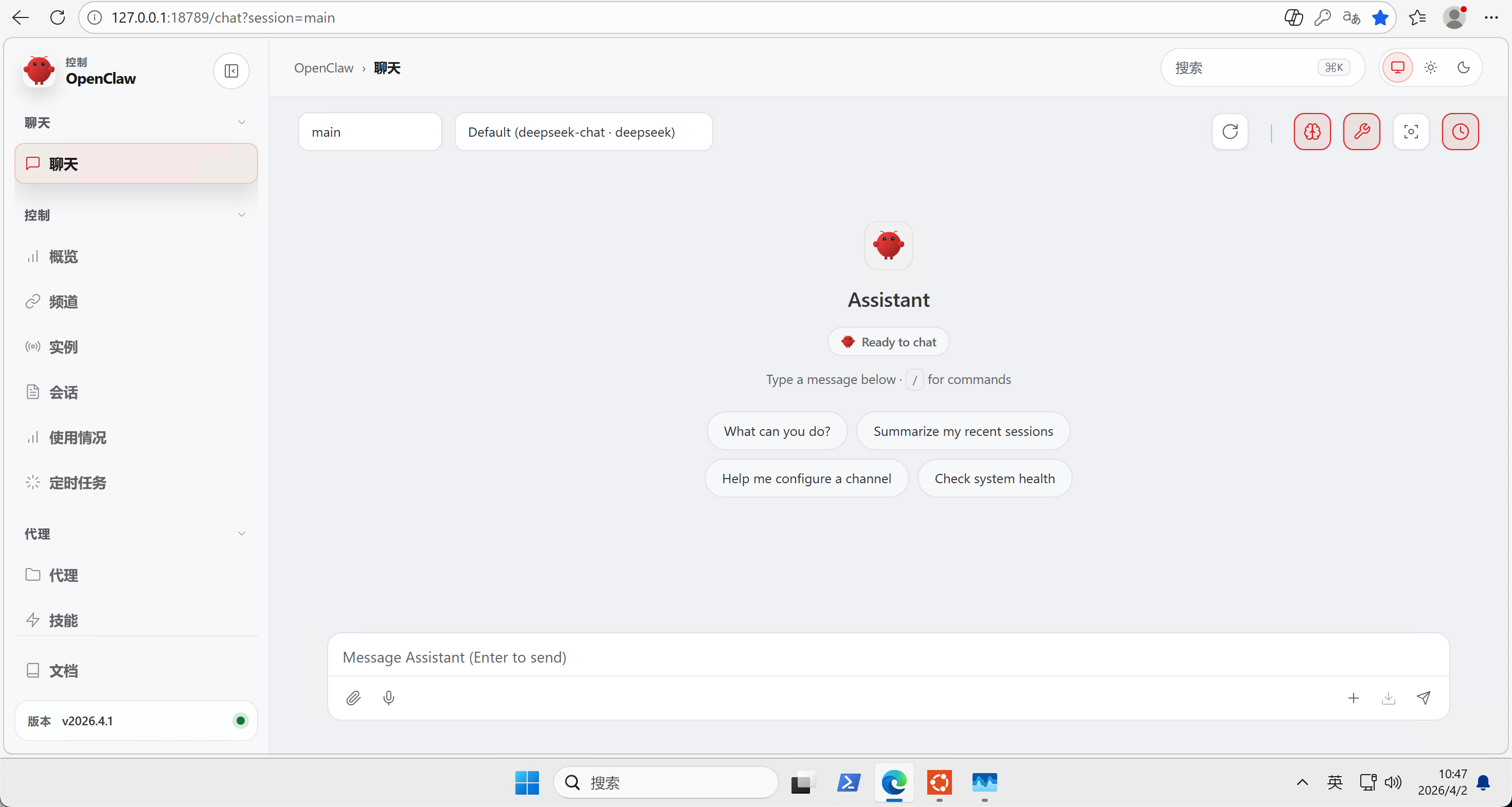
本文是原创文章,采用 CC BY-NC-ND 4.0 协议,完整转载请注明来自 Lukey
评论
匿名评论
隐私政策
你无需删除空行,直接评论以获取最佳展示效果